
I’ve seen this happen a million times, so I’m finally posting a quick tip about it. It happens to a lot of end users. Sometimes it happens to developers. Some Administrators have even weighed in on this issue.
Regardless, it happens to all of us. Don’t be embarrassed.
What are we talking about? When you deploy the Zoom feature on Reports and it…doesn’t seem to work.
I say “doesn’t seem to work” because the number one cause I’ve found for this issue is user error. But I will give a couple of other reasons for it that are not necessarily user error…just to make everyone feel better. 🙂
Wait…What is the Zoom Feature?
First of all, what is the Zoom feature? This used to be called Expansions in FR (“Financial Reporting” to you young’uns). This is a feature that you configure on row and/or column headers and it allows you drill down directly into that parent member on a report.
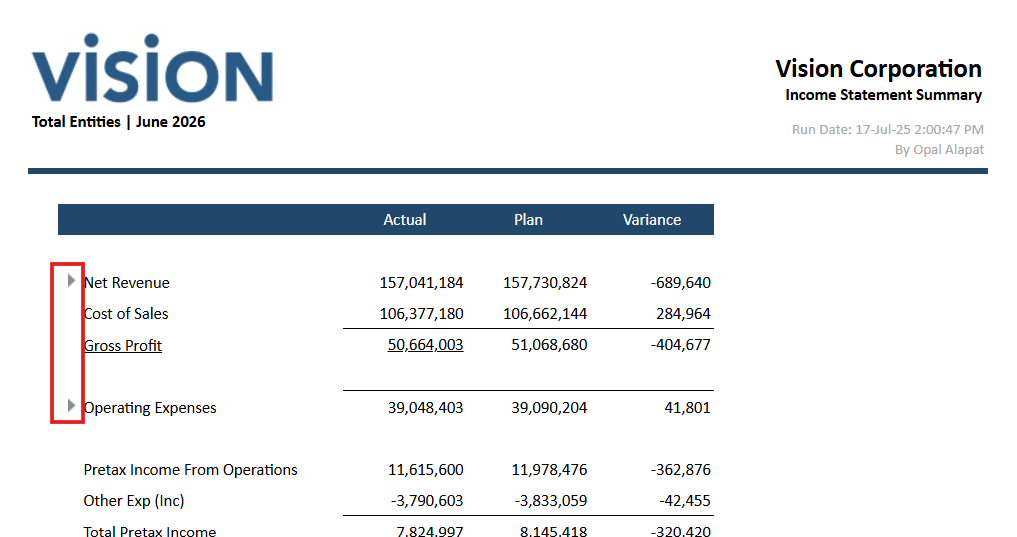
It displays like the below, with little right-pointing arrows next to the parents that you can click to expand to a lower level of detail. They can be on the rows and the columns in Reports grids:
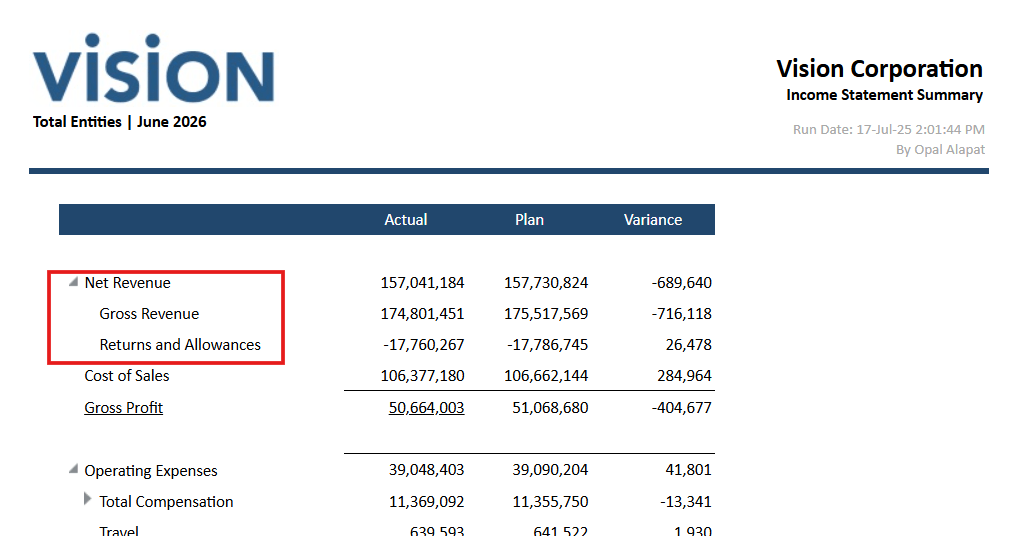
And here’s what it looks like when you expand them. The arrow changes slightly to indicate it has been zoomed in on:
But sometimes it doesn’t seem to work. You run the report. It looks lovely. But where are the little triangles that allow you to drill into those pesky parents? What is happening?
The #1 Reason Why Zoom Doesn’t Work
The #1 reason why this doesn’t work can usually be chalked up to user error. Can you guess what it is? I’ll give you a hint. It has to do with different viewing formats.
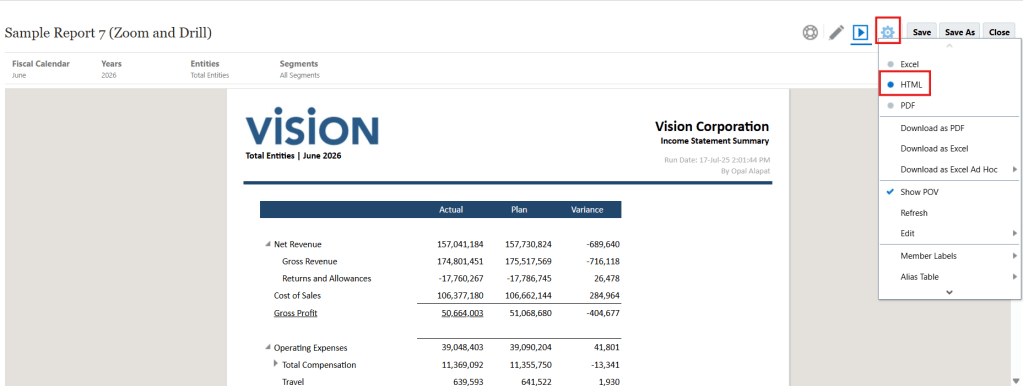
The #1 reason why the Zoom seemingly disappears is because the user has switched to PDF mode instead of HTML mode. Zoom and other interactive report features only work when in HTML mode. So this is always the first place I check. In case you’re curious as to why this happens so often, take a look at the difference between HTML and PDF mode.
HTML mode (you can see the Zoom triangles):
PDF mode (and…now they’re gone! And there are PDF-unique features in the middle of the screen.):
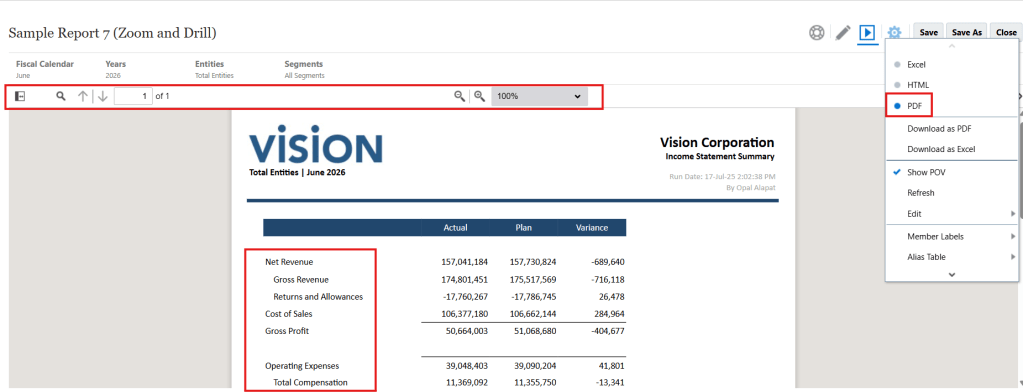
The above is actually a testament to the UI of the NR Oracle interface. Both HTML and PDF display formats look so similar that users often forget which mode they’re in. 🙂
As I said, don’t feel embarrassed if this happens to you. It happens to everyone, even me.
The #2 Reason Why Zoom Doesn’t Work
The #2 reason why Zoom doesn’t work is often due a protocol the user may not be aware of. It might be that they’re using a different web browser than the recommended Google Chrome. If you’re using Edge, Firefox, or Safari, there are things that just don’t work in those web browsers in NR (and other systems in Oracle EPM).
The fix? Switch to Chrome. Make it a standard for users. If you can’t, complain to Oracle so they can create parity between web browsers (but note that Chrome is the recommended browser for all Oracle EPM users).
The #3 Reason Why Zoom Doesn’t Work
And the final reason why I see Zoom not working is completely outside of user control. And it’s because there is actually something wrong with NR, like a bug. This is a rare case that I’ve maybe only seen once in my ~10 years working with NR. Log an Oracle SR if the above fixes don’t work.
The more you know…

